Chiclets
What They Are
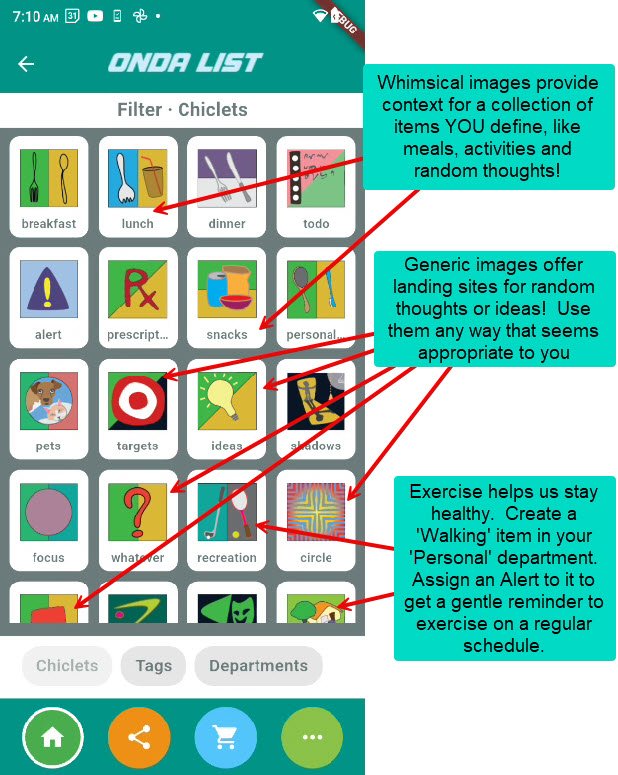
Chiclets are like baskets for your thoughts — you decide what goes inside. Instead of searching through 250–500 items, a chiclet becomes a visual shortcut to the items that matter for a specific task.
Why They Matter
Chiclets might be easier to remember. A picture is worth a 1000 words; the context might be broader. But you decide what works for you. Chiclets let you create groups of items from your universe of items.
What You Can Do With Chiclets
Chiclets are playful, visual groups of items you define
Each chiclet represents a “set”: Meals, Activities, Routines, Ideas, anything
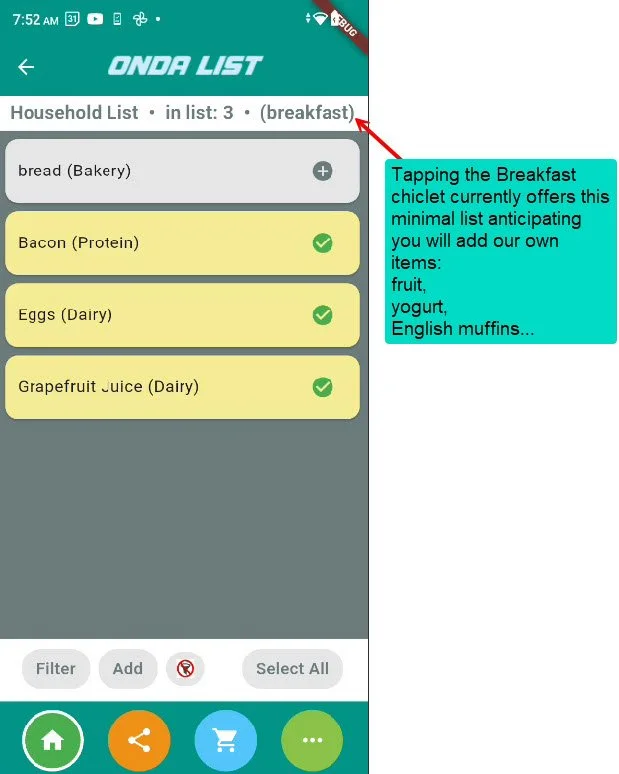
Tap a chiclet to show only the items in that set
Tap the “No Filter” button to return to your full list
Examples:
Breakfast → eggs, yogurt, bacon, bread
Snacks → chips, popcorn, pretzels
Pets → food, treats, meds
Travel → chargers, pills, toiletries
Projects → tape measure, screws, glue
How Chiclets Work
Choose a chiclet
(Breakfast, Snacks, Pets… or your own)Add items to it
(Tap + to build the set)Tap the chiclet
ONDA LIST shows only the items you put inside.Tap “No Filter”
Return to your full household list.
Chiclets help you move faster by showing only what’s relevant.
Adding or Changing Items
To manage the items inside a chiclet:
Tap Manage Chiclets
Select a chiclet
Add or remove items
Rename the chiclet (optional)
Each chiclet is yours to define — meals, hobbies, reminders, errands, anything.
Tips
Start simple: Breakfast, Pets, Snacks
Add more chiclets as you get comfortable
You can create “idea chiclets” too — like “reminders,” “projects,” or “to try”
A chiclet with no items is normal — it’s just waiting for you to fill it
Each chiclet becomes more useful the more items you assign to it
Manage Chiclet Filters
To change the items you included your list of items
Chiclets are whimsical visual collections of grocery items, ideas, activities, thoughts, and notions.
Tap a chiclet to filter; the app automatically returns your preselected list.
Tap the no-filter button to clear the filter and return to the household list.